LLM Fact Book.

Your private data workbench

Sensitive data. Verifiable answers.

Open your files, see what needs fixing, ask questions in plain English, and check the calculation behind every answer. It all runs on your own computer, without writing code.

For Windows. 14-day free trial, no card needed. For health departments, researchers and analysts who work with sensitive data.

LLM Fact Book at work

A question typed in plain English, answered with a ranked bar chart of percent change in median wait time by clinic.
Ask in plain English, even a long, specific question. The answer, its chart and its table all come from calculations over your data.

All screens show demo data.

Connect, review, prepare, ask

  1. 1

    Connect

    Open CSV or Excel files, or connect a SQL database or Snowflake.

  2. 2

    Review

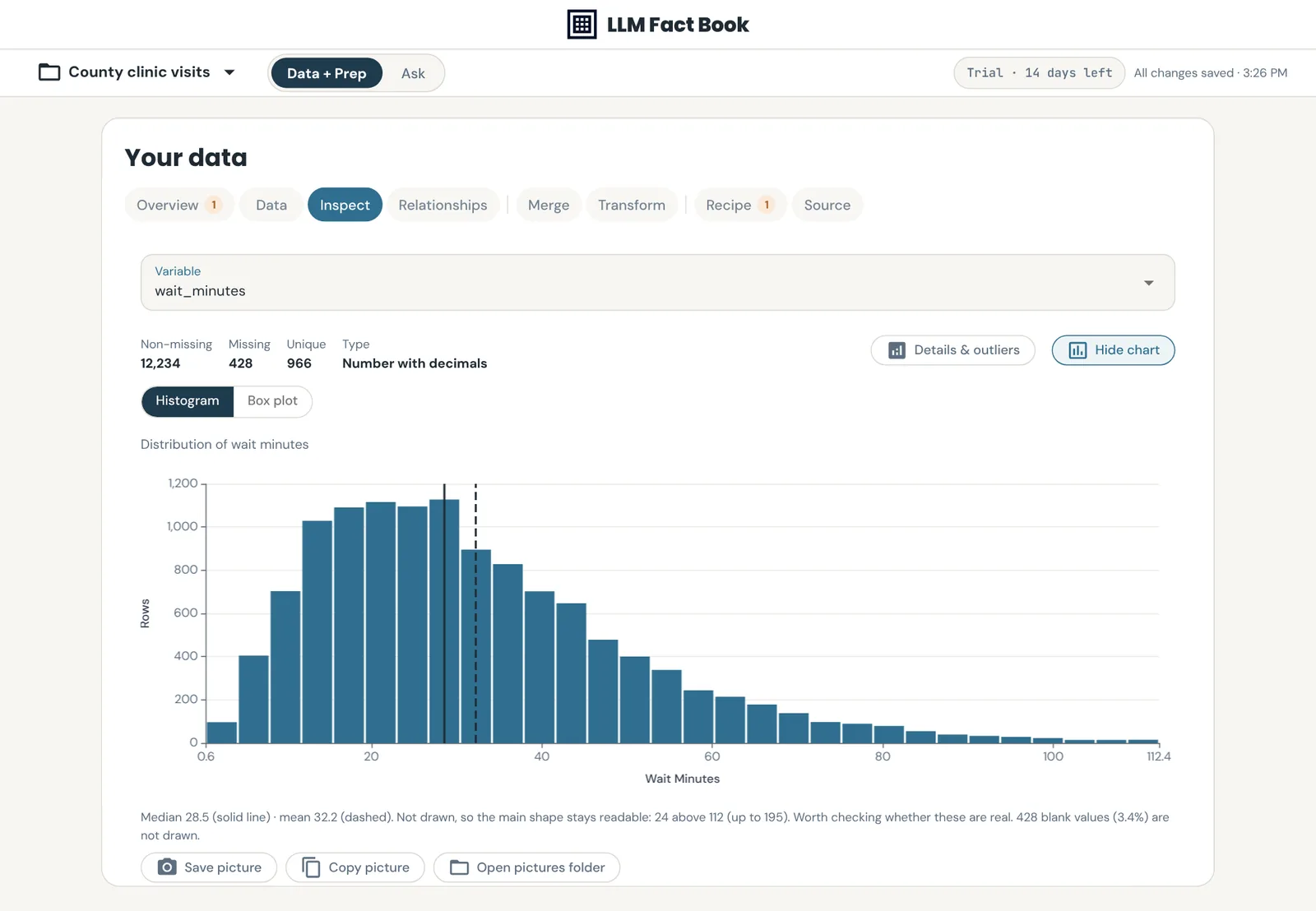
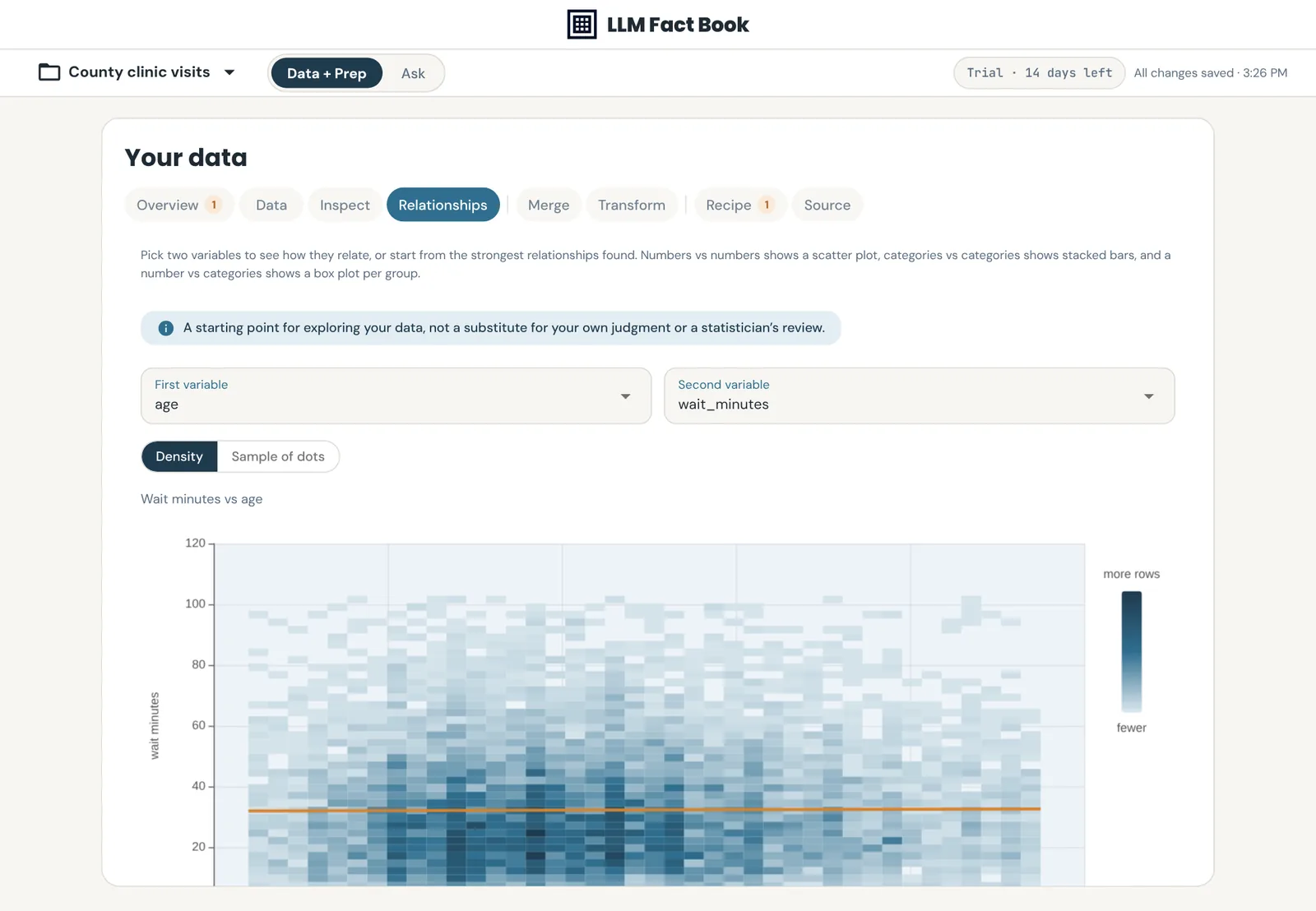
    See what needs a look before you trust it: blanks, stand-in values, repeated IDs. Inspect any column, or how two relate.

  3. 3

    Prepare

    Merge files, fix columns and add calculations. Every step is recorded as a recipe.

  4. 4

    Ask

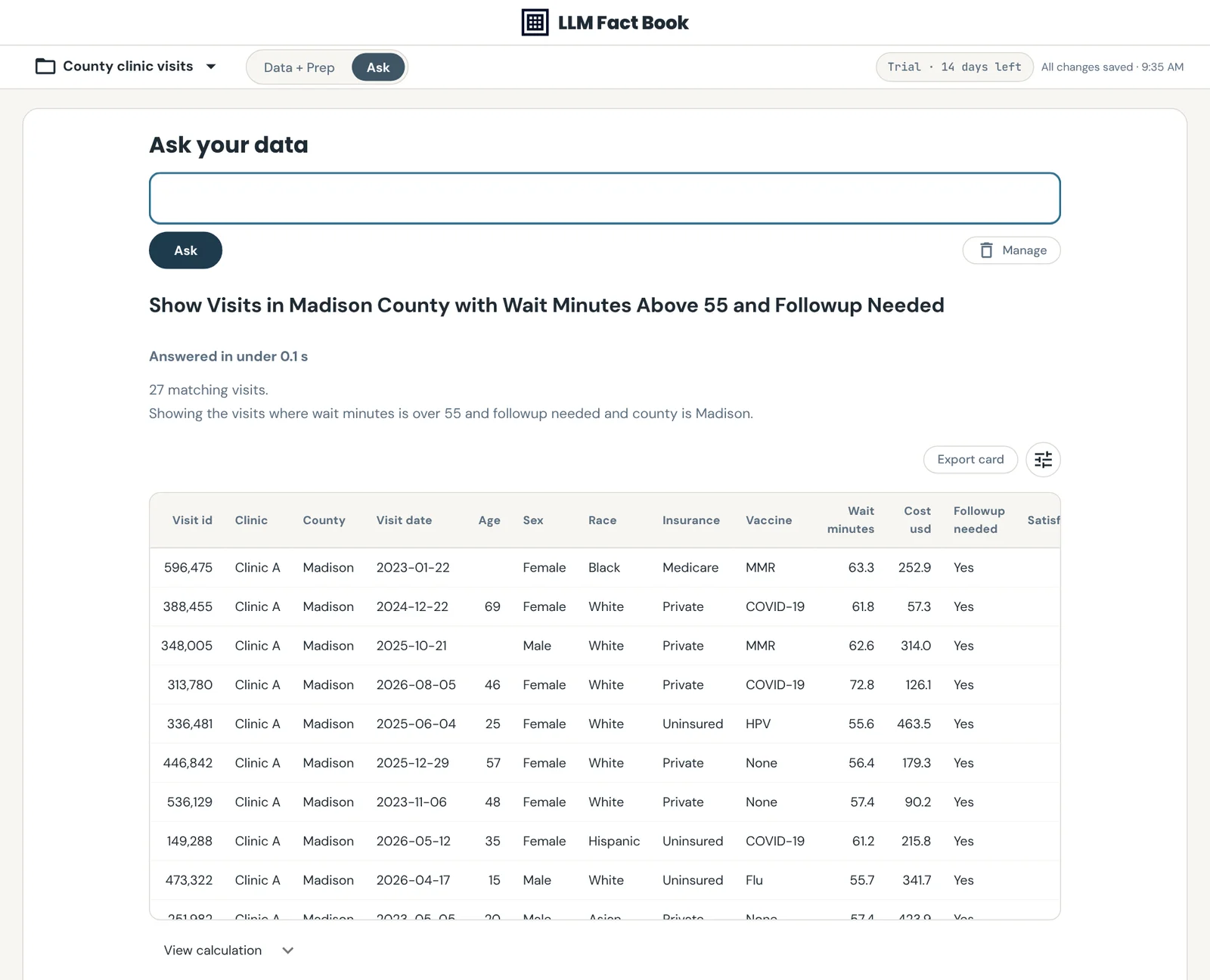
    Type a question. See the answer as a sentence, a chart and the table behind it, with the conditions applied.

An answer listing 27 matching visits, the conditions applied in plain words, and the table of those visits.
The count, the conditions in plain words, and the table behind the answer. Demo data.

Answers you can check

Answers are grounded in calculations over your own rows. The numbers come from your data, not from a model's memory. Repeat the same calculation on unchanged data and settings and you reproduce the result.

  • Every answer shows its work. The sentence, the chart and the table behind it all come from the same result, with a "View calculation" step.
  • It asks instead of guessing. If a question could mean two things, you pick one before anything is calculated.
  • It says when it can't. If your data can't answer a question, you are told so, with examples of questions that will work on your columns.
  • What, not why. It counts, averages, ranks and compares what is in your data, including changes against the same quarter last year. It doesn't guess at causes or forecast.

Look before you ask

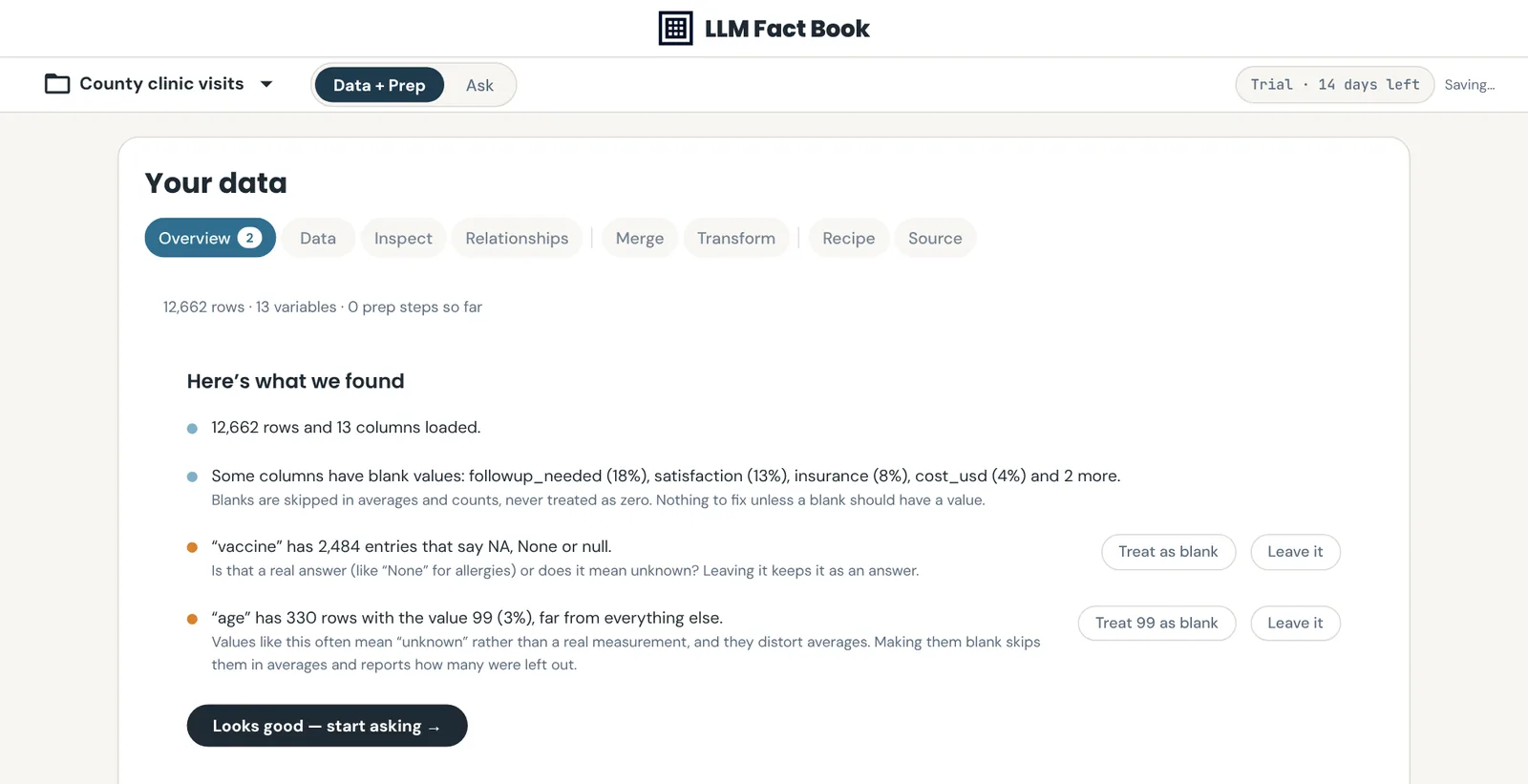
Most wrong answers start with data that was never checked. Three views help you see what you have first.

The Overview tab listing blank values, an NA placeholder and age 99 used as a stand-in, each with buttons to treat it as blank or leave it.
Overview finds blanks, "NA" and "None" entries, and stand-in values like 99, explains why each matters, and lets you decide. Nothing changes until you say so.
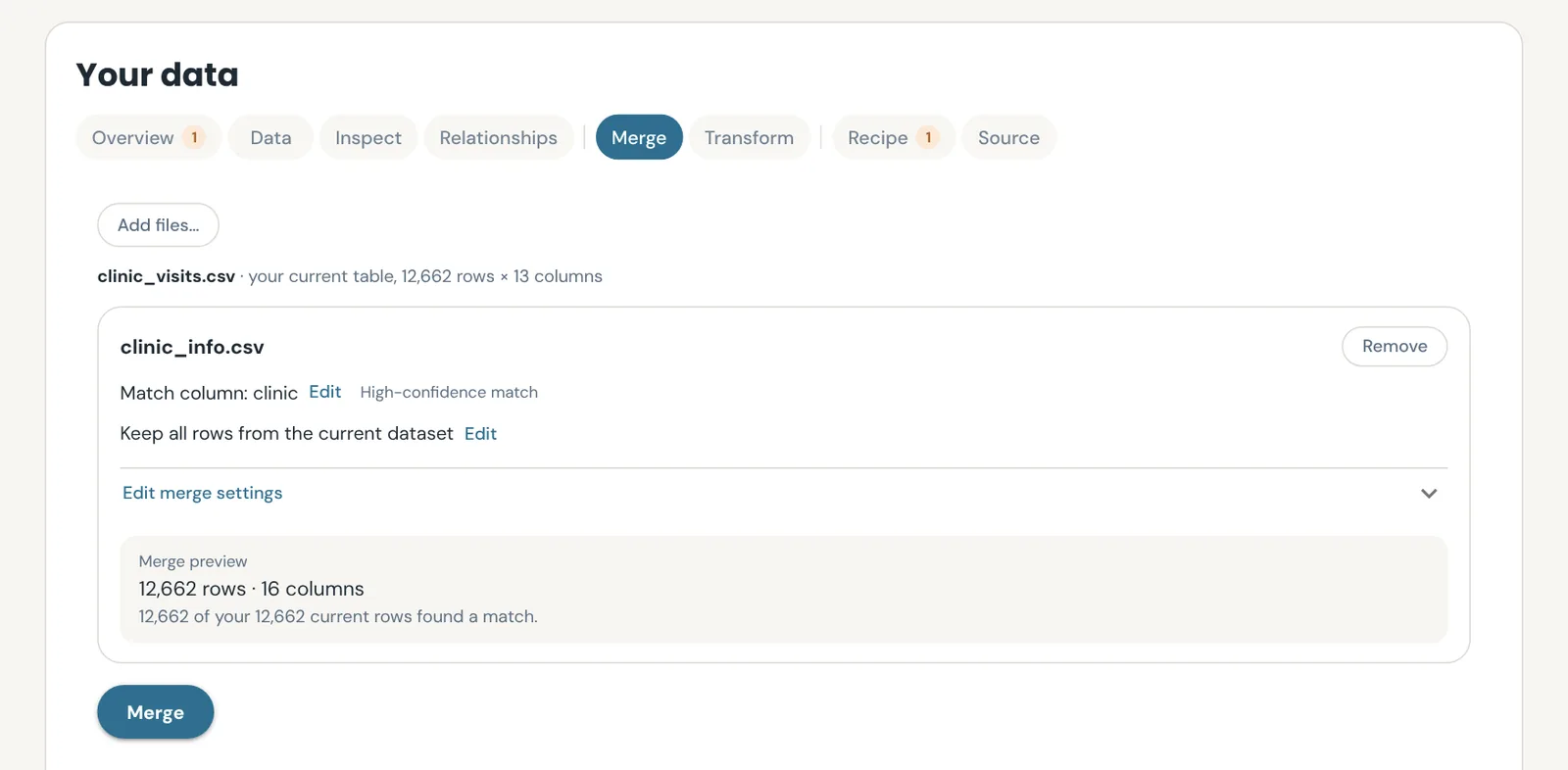
The Merge tab matching two files on the clinic column, marked high confidence, with a preview of the merged row count.
Merge suggests the join key and shows the result before anything changes. Demo data.

Get messy files ready without writing code

Real data arrives in pieces. LLM Fact Book helps you put it together and tidy it, and keeps a record of every step.

  • Merge files. It looks across your files for columns that can join them, ranks the options and explains each one. You can override any choice and preview the row counts first.
  • Clean after merging. Fix the combined table once, instead of fixing each file.
  • Split, group and calculate. Turn a "fever, cough" column into separate yes/no columns, bin ages, collapse categories and add calculated columns.

Prepare once. Keep the steps.

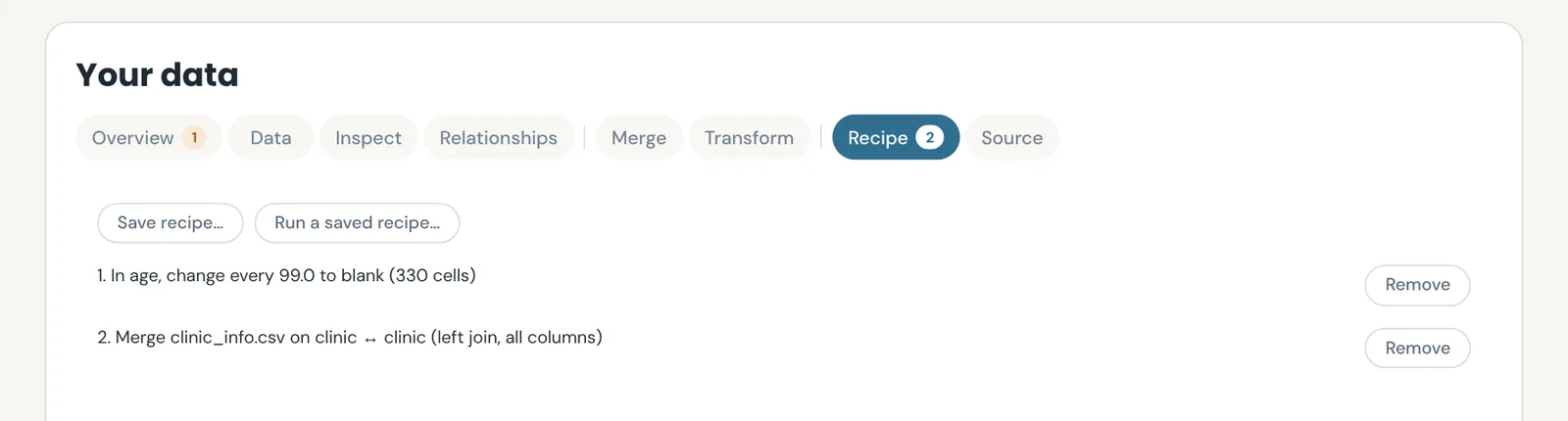
Merge files, clean columns and create calculations with a recipe that records your preparation steps. Review the sequence and remove a step when your analysis changes.

  • Save it. Keep a recipe as a small file on your computer. It holds the steps, never your rows.
  • Run it again. Apply the same preparation steps when refreshed data arrives. Merge steps ask you to pick their files again.
  • It won't run on the wrong file. A recipe built for health data refuses a revenue file, and tells you exactly which column or group it couldn't find.
The Recipe tab listing two preparation steps, with buttons to save the recipe or run a saved one.
Every step is listed. Remove one and the rest replay. Demo data.

Total control. Nothing private in the cloud.

There is no upload step, because there is nowhere to upload to. Your data is read, calculated and kept on your own computer.

What we receive

Your license key, an anonymous code for your computer (not its name) so we can keep to the device limit, and the app version. Nothing else.

What we never receive

Your rows, columns, questions, answers, file names or recipes.

Connections you choose are separate. Asking questions in plain English needs a one-time setup: the app helps you download Ollama (about 1.7 GB) and a language model (about 5 GB) from their publishers, and both then run on your computer. If you connect a remote SQL or Snowflake database, the app talks to that database, and your results still stay on your computer.

Simple pricing

Start with a 14-day free trial, no card needed. Monthly plans cancel any time; the yearly pass does not renew by itself. When a trial, subscription or pass ends, the app becomes read-only: you can still open your data and export it, but not run new analysis. Sold to customers in the United States for now.

2 months free

Individual

For one analyst working on their own.

$150 per year

Paid once for 12 months. That works out to $12.50 a month.

  • Use it on up to two devices
  • All features, including Merge and Recipes
  • Keeps working offline for up to 14 days between license checks
  • Free trial for 14 days, no card needed

Teams and institutions

Need several seats, a quote, or a purchase order?

Let's talk

We arrange these by hand, as a yearly license

  • Quote and invoice on request
  • Pay by purchase order
  • One yearly price for your group
Email us

How paying works. Payments are handled by Creem, our payment provider and the seller of record. When you choose Subscribe or Buy, you go to Creem's secure checkout page, and when you finish it brings you back to a confirmation page on this site with your next steps. Creem emails your receipt and your license key. We never see your card details.

Cancel a monthly plan and it ends when the month you paid for does. The yearly pass is 12 months and does not renew by itself; we email you before it ends. Monthly payments are not refunded once the month has started. The yearly pass is refunded in full if you ask within 14 days of payment. See the terms, privacy notice and refund policy.

Questions

What do I need to run it?

A Windows 10 or 11 (64-bit) computer, with about 16 GB of memory for comfortable use, and at least 10 GB of free disk space for the one-time Ask setup. Everything runs on it, so you do not need a server or an account with anyone else. The download size and a checksum for your IT team are on the download page.

Does it need the internet?

Not to analyze files on your computer. The app checks your license about once a week, and keeps working offline for up to 14 days after the last successful check. You also need a connection for the one-time Ask setup, which downloads Ollama and the language model (about 7 GB in all), and for any remote database you choose to connect.

What happens when my trial or subscription ends?

The app becomes read-only. You can still open your data, look at past answers and export, but you can't ask new questions or change your data until you subscribe or buy another year. Nothing is deleted.

What does "two devices" mean?

You can use one license on two computers, such as a desktop and a laptop. To move to a third, use "Move this license" in the app, or email us and we will free a slot.

Can it make up numbers?

No. Every number is calculated from your own rows, and the table behind each answer is one click away. A language model helps read your wording, but it does not produce the numbers. If a question is unclear, it asks you.

What can I ask?

Counts, averages, medians and percentiles; rankings like "top five clinics by average wait"; shares and percentages; filters by value, date or range; and changes against the same quarter or year last year, such as "which five clinics had the biggest percentage increase in median wait versus the same quarter last year, excluding clinics with fewer than 100 visits?" It answers what the data shows. It doesn't explain why something happened or forecast what comes next, and when it can't answer a question it tells you and suggests ones it can.

What data can I use?

CSV and Excel files, SQL databases and Snowflake. You can merge several sources before you start asking questions. Remote databases need a network connection, and their exact requirements will be listed before launch.

How do updates work?

The License window tells you when a newer version is available. Download it from this site and install over the old one. Your projects and recipes stay where you saved them, and older ones keep opening.

How do I cancel?

For a monthly plan, use the link in your receipt email, or write to us. A yearly pass does not renew, so there is nothing to cancel; it simply ends after 12 months. There are no cancellation fees.

Ready when your data is.

Try it free for 14 days. No card needed.

Download free trial

Email us